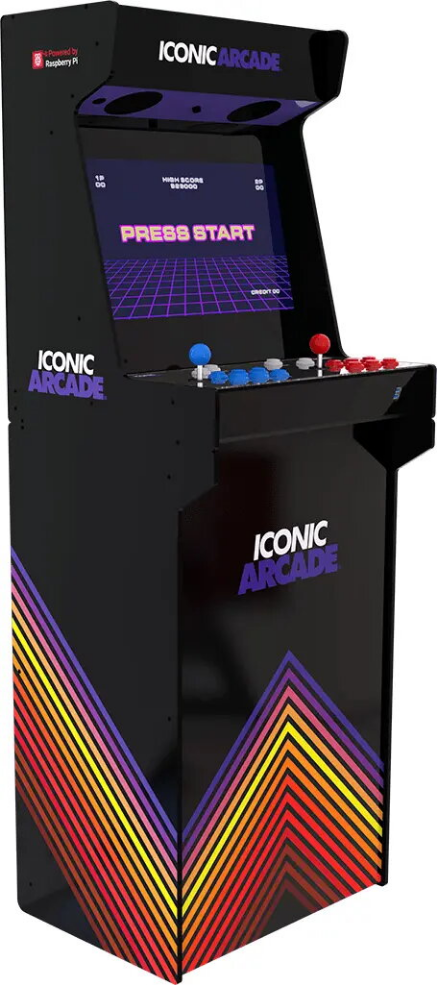
Arcade cabinet Iconic Arcade – Full HD IPS 21″, Cortex-A72 1.5 GHz, 1 GB RAM, Wi-Fi, Gigabit Ethernet, MicroSD, Bluetooth, DC power

SKU: 11656086

Apple Shopping Event

Hurry and get discounts on all Apple devices up to 20%

Sale_coupon_20

436,99 

  • Free shipping €100
  • 30 day return
  • Warranty 1 year

Description

Bring home the arcade classics with the ICONIC ARCADE REVOLUTION, an all-in-one home arcade system built around a Raspberry Pi 4B motherboard. The unit supports multiple retro operating systems and lets you play thousands of classic arcade titles on a 21″ Full-HD display with integrated stereo speakers and hardware controls. Available in tabletop and console form factors, the system is designed for straightforward installation of popular emulators and games to recreate authentic arcade experiences at home.

Advantages

The Raspberry Pi 4B ensures wide compatibility and expansion options, supporting Batocera, Recalbox, RetroPie and Lakka. Integrated audio with a Class-D amplifier and dedicated hardware controls (16 game buttons and two microswitch joysticks) provide an authentic arcade feel. Multiple connectivity options—Wi‑Fi, Bluetooth and Gigabit Ethernet—plus HDMI and USB ports allow flexible setup and peripheral connection. Compact dimensions and offered form factors make the unit suitable for tabletop placement or console-style home installation.

Key specifications

  • Model: ICONIC ARCADE REVOLUTION (tabletop & console options)
  • Motherboard: Raspberry Pi 4B
  • Display: 21″ Full-HD
  • Speakers: 2 × 4″ stereo speakers
  • Amplifier: Class-D digital stereo amplifier
  • Controls: 16 game buttons and 2 microswitch joysticks
  • Connectivity: Wi‑Fi, Bluetooth, Gigabit Ethernet
  • Ports: 2 × USB, HDMI, stereo audio jack, Micro-SD card slot
  • Power: DC-IN 90W 12 V / 7.5 A
  • Product size: 56 × 50 × 158 cm (22 × 20 × 62 in)

How to use

Install a compatible retro operating system such as Batocera, Recalbox, RetroPie or Lakka onto a micro‑SD card, insert it into the Micro‑SD slot and power the unit with the supplied DC‑IN adapter. Configure network settings via Wi‑Fi or Ethernet to download updates or transfer ROMs, and connect controllers or a keyboard/mouse via USB or Bluetooth as required. Use the system menu to select games and play with the built-in joysticks and buttons; adjust audio and display settings in the configuration menus.

Recommendations

Use a high-quality micro‑SD card (Class 10 / UHS‑I recommended) for reliable performance and keep firmware and emulator software up to date. For optimal multiplayer sessions, verify controller mappings and connect a keyboard and mouse when games require additional input.

Overview

Product colour:Multicolour
Card reader integrated:Yes
Wi-Fi:Yes
Bluetooth:Yes
Ethernet LAN:Yes