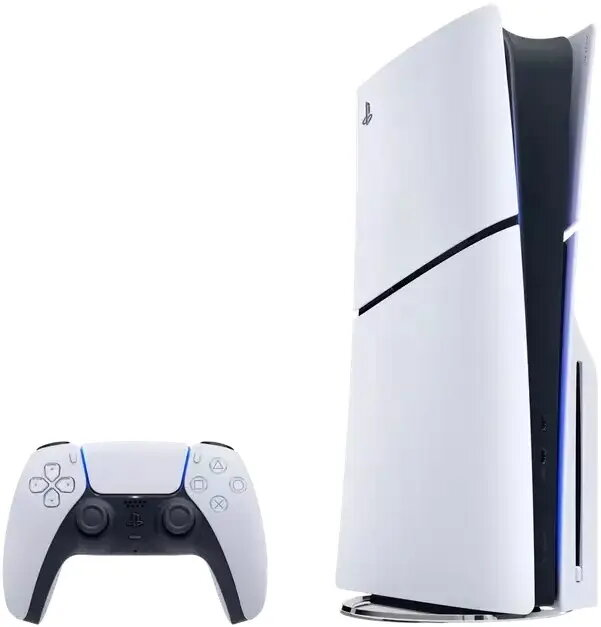
Gaming console Playstation Sony PlayStation 5 1TB storage, disc-less/Digital Edition

SKU: 11632531

Apple Shopping Event

Hurry and get discounts on all Apple devices up to 20%

Sale_coupon_20

1.319,99 

  • Free shipping €100
  • 30 day return
  • Warranty 1 year

Description

The Sony PlayStation 5 Digital Edition is a current-generation gaming console with 1TB of internal storage designed for digital-only gameplay. It delivers fast SSD-based load times and supports a wide library of PS5 digital titles available from the PlayStation Store. The console targets single-player and multiplayer experiences and is built to run modern games with enhanced performance, high-fidelity visuals, and responsive input.

Advantages

The PS5 Digital Edition offers high-speed system performance thanks to its custom solid-state drive, reducing loading screens and enabling quicker level streaming. With 1TB of onboard storage, it provides room for multiple modern game installations and updates. The digital-only configuration eliminates the physical disc drive, reducing noise and making the unit more compact. Native support for PS5 features such as adaptive triggers and haptic feedback (via compatible controllers) and access to the PlayStation Store expand the available game library and digital services.

Suitable for

  • Players who prefer purchasing and storing games digitally
  • Gamers seeking fast load times and modern SSD performance
  • Users who mainly play online multiplayer and single-player story-driven titles
  • Households where a smaller, quieter console is preferred

Key specifications

  • Internal storage capacity: 1TB SSD for system and game installations
  • Console type: Digital edition (no optical disc drive)
  • Video output: supports up to 4K resolution and HDR where supported by games and display
  • Connectivity: HDMI output, USB ports, Wi‑Fi and Ethernet networking capabilities
  • Controller support: DualSense features with haptic feedback and adaptive triggers (when used with compatible controller)

How to use

Connect the console to a compatible display using the HDMI output and network using Wi‑Fi or an Ethernet cable. Power on the system and complete the initial setup steps displayed on-screen, including signing in with or creating a PlayStation Network account. Access the PlayStation Store to purchase and download digital games directly to the 1TB internal SSD. Manage storage through the system settings to install, delete, or archive games as needed. Use a DualSense controller for gameplay; features such as haptic feedback and adaptive triggers are available when supported by individual titles.

Usage recommendations

To maintain optimal performance, keep the system software and game software up to date, monitor available storage and remove unused titles, and ensure adequate ventilation around the console. Use a reliable internet connection for downloads and online play, and consider external storage solutions compatible with the console if additional capacity is required.

Overview