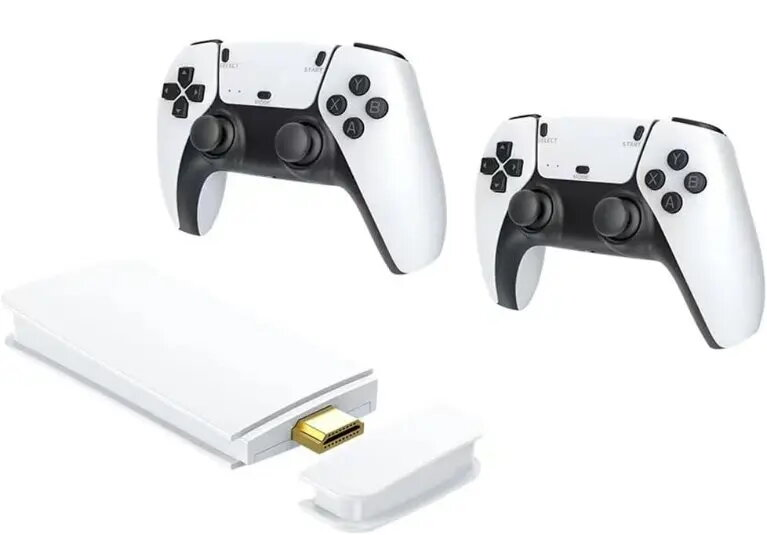
Retro game console Plaion SJGAM M15 Plus – 20 emulators, 20,000+ games, 2 controllers

SKU: 12036475

Apple Shopping Event

Hurry and get discounts on all Apple devices up to 20%

Sale_coupon_20

41,99 

  • Free shipping €100
  • 30 day return
  • Warranty 1 year

Description

Plaion SJGAM M15 Plus is a plug-and-play retro game console preloaded with more than 20,000 games and supporting 20 emulators. The system is supplied with two wired controllers and connects directly to modern TVs using standard video output, enabling local multiplayer and arcade-style sessions without additional setup. The console is intended for nostalgic gaming, offering a broad software library and a compact hardware design suitable for living rooms and casual play.

Advantages

The console provides immediate access to a large, organized game collection and broad emulator support, reducing the need for configuration. Two included controllers allow instant local co-op and competitive play. The device is designed for simple connection to contemporary television sets and offers compatibility with a wide range of classic game formats. Its compact footprint makes it easy to integrate into existing home entertainment setups while preserving keyboard-free, controller-first operation.

Suitable for

  • Nostalgic single-player sessions with classic titles
  • Local multiplayer and co-op gaming with two players
  • Arcade-style gaming and short play sessions
  • Home entertainment centers and living-room setups
  • Users seeking a plug-and-play retro gaming experience

Key specifications

  • Preloaded games: over 20,000 titles across multiple platforms
  • Emulator support: 20 different emulation cores covering classic systems
  • Controllers: two wired game controllers included for local multiplayer
  • Connectivity: standard TV video output compatible with modern televisions
  • Form factor: compact console designed for home use

How to use

Connect the Plaion SJGAM M15 Plus to your television using the provided video cable, plug the power supply into a mains outlet, and attach the two controllers to the console. Power on the console; the built-in interface will present the game library and emulator selection. Navigate the menus with the controller, choose an emulator or game, and start playing. No additional software installation is required for typical use.

Usage recommendations

For best results, use a modern flat-panel TV with compatible input ports and place the console near the display for easy controller cable routing. Keep controller cables untangled and avoid placing the console in enclosed, poorly ventilated spaces during extended play sessions.

Overview