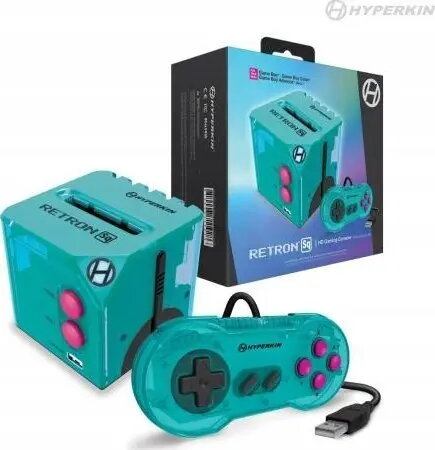
Console Hyperkin RetroN-SQ HD – Hyperkin model M01128-HYB

SKU: 12064261

Apple Shopping Event

Hurry and get discounts on all Apple devices up to 20%

Sale_coupon_20

97,99 

  • Free shipping €100
  • 30 day return
  • Warranty 1 year

Description

Hyperkin RetroN-SQ HD is a dedicated retro gaming console designed to play original cartridge-based games on modern HDTVs. The unit accepts classic cartridges and converts their video and audio output to HDMI, enabling use with current displays while maintaining the original gameplay experience. The console is plug-and-play and provides a straightforward connection path for players who want to use legacy game media without needing the original hardware’s AV outputs.

Advantages

The console offers HDMI output for high-definition displays, preserving the look and aspect ratio of classic cartridge games while simplifying connectivity to modern TVs. It is compatible with widely used cartridge formats and supports direct playback without complex setup. The compact design and single-cable HDMI connection reduce clutter and make the system easy to integrate into existing home entertainment setups.

Suitable for

  • Players who own original retro game cartridges and want to play them on modern TVs
  • Collectors seeking a convenient way to test or demonstrate cartridge-based games
  • Retro gaming enthusiasts looking for a simple plug-and-play HDMI solution

Key specifications

  • Video output: HDMI for connection to HDTVs and monitors
  • Audio output: digital audio via HDMI
  • Media: compatible with original cartridge-based games
  • Power: external power supply (as supplied with the unit)
  • Controls: supports original-style controller input (controller model compatibility depends on controller ports and adapters)
  • Form factor: compact console designed for tabletop use

How to use

Insert a compatible game cartridge into the console slot and connect the HDMI cable to your TV or monitor. Attach the supplied power adapter and any compatible controllers. Switch on the console using its power control; the system will output video and audio through the HDMI connection. Use the connected controller to navigate game menus and start play. No additional software installation is required for standard cartridge playback.

Usage recommendations

Use a stable HDMI connection and set your TV to the appropriate input. If image scaling or aspect ratio adjustments are available on the TV, configure them to preserve the original game’s display proportions. Store cartridges in protective sleeves when not in use and ensure connectors are clean before insertion to maintain reliable operation.

Overview